

How a Professionally Developed Website Improves Customer Trust
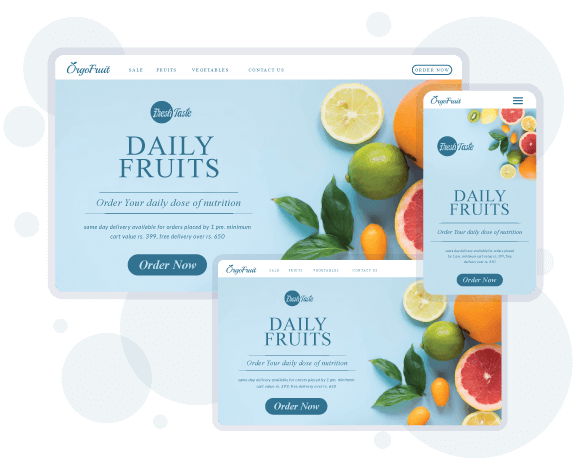
Imagine, two businesses offer the same service worldwide. You visit the first company’s site – it loads instantly, looks polished, has clear messaging, and shows real customer testimonials.
Next, you visit the second – it’s slow, cluttered, and the contact info is hard to find. Which one feels more trustworthy? Exactly. In a fraction of a second (as little as 50ms), visitors form an opinion of a site’s credibility.
A professionally built website acts like a strong digital handshake – projecting confidence and authenticity. From Singapore to Silicon Valley, users around the globe judge a business by its site’s design and transparency.
In this post, we’ll explore why professional design, solid tech foundations, and clear trust signals on your website make customers say “yes, I trust this company,” rather than hitting the back button.
First Impressions: Professional Design Builds Trust
Your website is often your digital storefront, and first impressions are everything. In fact, 94% of people cite poor web design as the reason they mistrust a website. High-quality images, a clean layout, and a cohesive color scheme all tell visitors your brand is serious about quality.
Think of it like walking into a store – if the shelves are well-organized and the lighting is inviting, you immediately feel confident. Web credibility research echoes this: “The first step to garnering trust is to make your site appear legitimate and professional”.
Consistent branding (fonts, logos, messaging) reinforces that confidence. For example, a financial website that uses a blue palette (a color linked to reliability) and a clear, easy-to-read font helps ease anxiety for the user.
- Sleek Layout & Colors: Use a modern design and a few complementary colors. A minimalist, uncluttered interface suggests expertise and transparency.
- Responsive Navigation: Logical menus and intuitive navigation labels help users find information quickly. Nielsen Norman Group found that obvious navigation (no gimmicky labels) makes users feel confident and satisfied.
- Consistency Across Pages: Repeat your header, footer, and branding on every page. Familiar patterns (logo top-left, menu at top) reduce friction and reassure visitors they’re still in the right place.
Effective design isn’t about flashy gimmicks, but about clarity and polish. When 4 out of 5 people choose a site because it looks more attractive and informative, it’s clear that small details (like high-res images and whitespace) can tip the scales. After all, “you wouldn’t trust someone who’s hiding something from you, would you?” The same goes online: transparent, attractive design makes visitors feel there are no surprises.
User Experience and Usability
A “pro” website not only looks good, but behaves well. Imagine clicking a button and nothing happens, or hunting for a “Contact” tab. Frustrations like that kill trust. Simple user experience (UX) is key:
- Intuitive Navigation: Buttons and links should lead where users expect. Break complex tasks into clear steps.
- Mobile-Friendly Design: With over half of web traffic on mobile, your site must adapt seamlessly to smartphones. A good mobile experience shows you care about the 21st-century user.
- Fast Load Times: Speed is a trust signal. More than half of users will abandon a site if it takes longer than 3 seconds to load. Slow sites feel unprofessional – visitors even interpret slow loading as “technical incompetence”. Fast performance, on the other hand, signals reliability. Use image compression, modern hosting, and performance best practices so that your site zips along; Google’s own research notes that quick loading improves both perception and search ranking.
A UX designer sketches wireframes and tests a website layout, ensuring a smooth, user-friendly experience that builds customer confidence.
By walking a customer through easy-to-follow flows (and avoiding dead-ends), you build trust. Remember that 88% of users are less likely to return to a site after a bad experience. Every page should clearly guide the visitor to the next step – whether that’s learning more, filling a form, or making a purchase.
In practice: place your most important call-to-action (like “Request a Quote”) where it’s impossible to miss, and always keep the user’s goal in mind. Empathetic UX design – like a friendly store clerk – makes people feel cared for, which breeds trust.
Technical Foundations: Speed, Mobile & Security
Beneath the surface of a good-looking site is solid technical work. A professionally developed website nails the under-the-hood stuff that customers feel subconsciously:
- Responsive & Mobile-First: A pro site is built to work on any device. Pages reflow, buttons enlarge, and menus simplify for touchscreens. If your site looks like it’s still living in 2015, global customers will notice and worry it’s not up-to-date. Websites that don’t cater to mobile traffic are sending the message “we’re out of touch,” while a smooth mobile interface shows you’re modern and attentive.
- Speed Optimization: Compress images, minify code, and use Content Delivery Networks. As mentioned above, a laggy site screams poor maintenance. Quick load times convey professionalism, as visitors often equate a fast website with a well-run business. In fact, Trustpilot data suggests that adding trust cues (like performance optimizations) can boost conversion rates by up to 42%.
- Security (SSL, HTTPS): Those little padlocks and “https://” matter big time. Modern browsers now warn users if a site isn’t secure, which instantly damages credibility. A pro developer ensures SSL certificates are in place so data is encrypted and users see that reassuring lock icon. Studies show that seeing these security trust badges raises confidence: 83% of people trust sites more when recognized security seals are visible.
A heavy-duty padlock symbolizes website security. Features like SSL certificates and secure payment badges on a website tell customers their data is safe, increasing trust.
Digital trust is built on bits and bytes too. Regular updates, firewalls, and secure coding practices protect user data and keep the site running smoothly.
When a professional web team handles these details, customers feel secure submitting their information. (Not to mention, Google now favors secure and fast sites in search rankings – another confidence boost for visitors.)
Trust Signals: Reviews, Transparency & Social Proof
Beyond design and tech, a genuine website shows proof. These “trust signals” answer a visitor’s unspoken questions: “Can I trust this business with my money and data?” Here are key trust-builders every site should include:
- Customer Reviews & Testimonials: Let real voices speak for you. According to Trustpilot, 93% of consumers say online reviews influence their buying decisions. Featuring authentic reviews (ideally with names or photos) and case stories reassures newcomers that others have already had positive experiences.
- Trust Badges & Certifications: Display logos of security certifications, well-known payment processors, or industry affiliations. Verlua notes that people place more trust in sites with third-party badges. For example, a Shopify seal or VeriSign badge next to checkout means “we passed a security check.”
- Clear Contact Information: Make it easy to contact you. Nielsen Norman emphasizes that listing a phone number, address, and email boosts credibility. (Surveys back this up: 44% of users will leave a site if there’s no visible contact info.) A dedicated page with an address, map, FAQs, and team bios shows there are real people behind the site.
- About Us & Team Photos: People trust people. A photo of the founder or team, along with a friendly story, humanizes your brand. As Stanford’s guidelines advise, showing “honest and trustworthy people” behind the site increases credibility. (Tip: use genuine photos – generic stock photos actually destroy credibility.)
- Relevant Guarantees & Policies: Clearly state your guarantees, return policy, or service warranties. Transparency about pricing (even if you only list ranges) and policies helps visitors feel safe. In fact, users have abandoned sites that hide fees or have endless forms, simply because “we don’t know what will surprise us”.
|
Trust Element |
Impact on Visitors (Stats) |
|---|---|
|
Customer reviews |
93% of consumers say reviews influence their choice |
|
Third-party security badges |
83% of people trust sites more when they see them |
|
Professional, clean design |
46% of users judge credibility by visual design |
|
Visible contact info |
Showing a phone number can raise leads by 54% |
|
SSL encryption (padlock icon) |
Boosts conversions by 29% |
Each trust signal is a piece of proof. Together, they make visitors comfortable taking the next step. Remember: “Stock photos destroy credibility”, but real photos of satisfied customers do the opposite. Sharing social proof – logos of clients, brief case studies, or media mentions – also reinforces that your business is established and legitimate.
Global Consistency: Trust Across Cultures
Good news: the fundamentals of trust are universal. A study across cultures found that the same website elements inspire trust worldwide. Whether a customer is browsing in Tokyo or Toronto, they look for professional design, useful content, and transparent info.
High-quality visuals and clear navigation mean the same thing everywhere: “these people know what they’re doing.” Designers know to avoid cultural missteps (such as color meanings or symbols), but the basic expectations don’t change. An up-to-date, error-free site signals reliability in any language.
By investing in a professionally developed site – perhaps with a Best Web Development Company that understands global audiences – you ensure these trust-building elements are all in place. The takeaway? Professional web development isn’t a luxury; it’s the foundation of credibility in an international marketplace.
Conclusion: Make Trust Your Website’s Foundation
Building trust online is much like earning respect in real life: it takes time, consistency, and the right first impression. A professionally crafted website sends customers a powerful message: “We’re real, we’re competent, and we’re here to help you.”
From clean design to fast performance, from honest contact info to authentic testimonials, every detail matters. When visitors arrive and everything feels right, they stay longer, engage more, and are far likelier to do business with you.
Remember, you have one shot at a first impression. By investing in professional web development and best practices, you transform your site into a trust magnet – turning curious browsers into loyal customers.
Now it’s your turn: is your website building confidence, or unintentionally raising eyebrows? Revamp it, add those trust signals, and watch your credibility (and conversions!) soar.
Ready to boost trust with a pro website? Consider consulting with experts to audit your design, speed, and trust elements. Share your thoughts below, or join the conversation on social media. For further reading on web credibility, check out Stanford’s Web Credibility Guidelines.
Frequently Asked Questions
A well-designed site immediately signals professionalism. Users rapidly judge credibility by visuals, so a modern, clean layout with consistent branding makes them feel confident in your business. Poor design (clashing colors, outdated graphics, typos) does the opposite.
Key trust signals are things like customer reviews, security badges (SSL padlocks), clear contact info (phone, address), and real photos of your team. These elements show that others have had positive experiences and that your business is legitimate.
Fast-loading pages feel professional. According to studies, half of users abandon sites that take longer than 3 seconds. Slow sites suggest neglect. A speedy site keeps users happy and conveys that your company pays attention to quality.
Absolutely. SSL (the “https://” and padlock) encrypts data and prevents browser warnings. Without it, modern browsers will mark your site “not secure,” instantly undermining trust. An SSL certificate boosts trust (and conversions) by showing you protect customer information.
Regularly. Even minor updates (new content, recent projects, current year on footer) signal that your business is active. Stanford’s research shows sites that display recent updates or review dates are seen as more credible. Conversely, outdated sites can make customers worry that you aren’t reliable.
.png)
.png)
Comments
Update Comment