

Social Media Post Design Charges: A Complete Pricing Guide
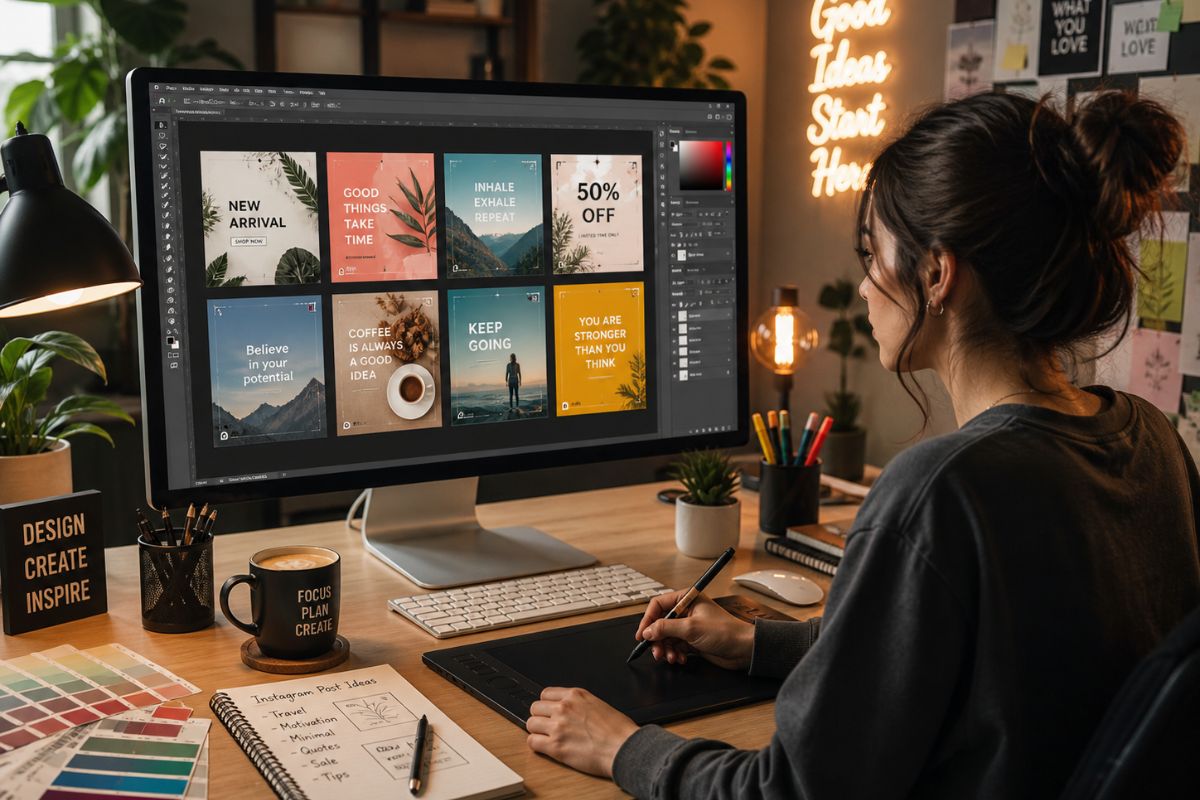
Every brand wants scroll-stopping social media graphics. That sounds simple, right? Until you ask for a quote and suddenly prices jump from $5 to $500 faster than a trending audio clip disappears from Instagram.
I get why Social Media Post Design pricing feels confusing. One designer charges per post. Another sells monthly packages. A studio offers “premium creative strategy,” which sounds impressive, but also makes your wallet sit up straight. The truth is simple: social media design charges depend on quality, scope, speed, experience, and how much thinking sits behind the visual.
If you want a polished, brand-ready look without guessing what works, working with Social Media Post Design Specialists can help you turn basic content ideas into professional posts that look sharp across Instagram, Facebook, LinkedIn, Pinterest, and more.
What Is Social Media Post Design?
Social Media Post Design means creating visual content for platforms like Instagram, Facebook, LinkedIn, X, TikTok, Pinterest, YouTube Community, and Threads. It can include static posts, carousels, story graphics, ad creatives, banners, quote cards, infographics, sale announcements, thumbnails, and branded templates.
A good design doesn’t just look “pretty.” It helps people stop, understand, feel, and act. That action might be a like, save, share, click, inquiry, or purchase. In other words, design isn’t decoration. It’s your brand’s handshake in a crowded digital room.
The price usually reflects how much creative effort goes into the post. A simple quote graphic costs less than a custom carousel with research, layout planning, icon design, copy support, and platform-specific sizing. Same category, different beast.
Why Social Media Post Design Charges Vary So Much
Here’s the funny thing about social media design: two posts can look similar at first glance, but one may involve five minutes of template editing while the other takes hours of brand thinking, visual hierarchy, typography, image treatment, and revisions.
That’s why Social Media Post Design charges vary across freelancers, agencies, marketplaces, and subscription design teams. You’re not only paying for pixels. You’re paying for taste, judgment, time, tools, experience, communication, and the designer’s ability to make your brand look like it has a plan.
Pricing also changes by region, industry, deadline, and content volume. A startup asking for 10 clean Instagram posts may pay less than a luxury brand needing campaign visuals for five platforms with multiple ad versions.
Current Market Reality: What Do Designers Usually Charge?
Most businesses compare rates before hiring, and that’s smart. However, don’t treat price ranges like restaurant menus. Treat them like weather forecasts. Helpful, but not always exact.
For broader design service benchmarks, resources like GoodFirms’ graphic design cost guide show how social media design pricing can change based on designer type, service scope, and package model.
In general, global Social Media Post Design charges often fall into these ranges:
|
Service Type |
Typical Price Range |
Best For |
|
Basic static post |
$5 to $25 per post |
Small businesses, simple updates |
|
Professional branded post |
$25 to $100 per post |
Growing brands needing consistency |
|
Premium custom post |
$100 to $300+ per post |
Campaigns, luxury brands, high-detail visuals |
|
Carousel design |
$50 to $500+ per carousel |
Educational, sales, and storytelling content |
|
Story design |
$10 to $75 per story |
Launches, offers, daily brand updates |
|
Ad creative design |
$30 to $250+ per creative |
Paid campaigns and performance marketing |
|
Monthly design package |
$300 to $2,500+ per month |
Brands needing regular content |
These numbers can move higher if you need custom illustration, motion graphics, 3D design, video editing, brand strategy, or rush delivery.
Per-Post Pricing vs Monthly Packages
When you hire a designer, you usually face two common options: pay per design or buy a monthly package.
Per-Post Pricing
Per-post pricing works well when you need occasional graphics. Maybe you have a product launch, event announcement, festive sale, or one-off campaign.
You pay for each creative, and the cost depends on complexity.
Best for:
- New brands testing visual styles
- Small businesses with limited posting needs
- One-time promotions
- Brands that already have templates
- Founders who need design help only sometimes
Monthly Packages
Monthly packages make more sense when you post regularly. You may get a fixed number of posts, stories, carousels, revisions, and sometimes basic content planning.
Best for:
- Personal brands
- E-commerce stores
- Coaches and consultants
- Agencies
- Local businesses
- SaaS brands
- Creators with weekly content calendars
Here’s a simple comparison:
|
Pricing Model |
Pros |
Cons |
|
Per-post pricing |
Flexible, easy to start, no long commitment |
Can cost more at high volume |
|
Monthly package |
Better consistency, easier planning, often better value |
Requires clear monthly needs |
|
Subscription design |
Fast turnaround, scalable output |
May feel less personal |
|
Agency retainer |
Strategy plus execution |
Higher cost |
|
Marketplace gig |
Affordable and quick |
Quality can vary a lot |
What Affects Social Media Post Design Charges?
Price depends on more than “one post.” That phrase hides a lot. A post can be a basic square graphic or a polished campaign asset with layered messaging and strong creative direction.
1. Design Complexity
A clean quote post costs less than a multi-slide carousel with custom icons, visual storytelling, graphs, and branded layouts.
Basic design may include:
- Text placement
- Simple background
- Brand colors
- Stock image
- Logo placement
Advanced design may include:
- Custom layouts
- Illustration
- Photo editing
- Icon systems
- Data visualization
- Creative direction
- Multi-format resizing
2. Brand Guidelines
If you already have brand fonts, colors, templates, logo files, and examples, the designer can work faster. If your brand identity lives somewhere between “I like blue” and “make it pop,” expect more time and cost.
A designer may need to create a mini visual system before designing your posts.
3. Number of Revisions
Revisions affect price. One or two rounds usually come included. Unlimited revisions sound nice, but they can turn a simple post into a design soap opera.
Clear feedback saves money. Vague feedback like “make it more premium” can help, but only if you explain what premium means for your brand.
4. Copywriting Support
Some clients provide final copy. Others expect the designer to create headlines, captions, hooks, and calls to action. That adds value, but it also adds cost.
Design and copy should work together. A stunning post with weak text is like wearing a tuxedo with muddy sneakers.
5. Platform Sizes
One Instagram post doesn’t automatically fit LinkedIn, Facebook, Pinterest, and stories. Each platform has different dimensions and user behavior.
Resizing may cost extra, especially when the designer needs to adjust layout rather than simply stretch the artwork.
6. Turnaround Time
Rush work costs more. A 24-hour delivery may require the designer to move other work, stay late, or skip their coffee ritual. Dangerous territory.
If you want better pricing, plan ahead.
7. Designer Experience
A beginner designer may charge less. A senior designer or agency may charge more because they bring stronger judgment, cleaner execution, and better brand understanding.
You can buy a cheap design. You can also buy a design that saves you from looking cheap. Those are not always the same thing.
Social Media Post Design Price by Provider Type
Different providers offer different levels of service. Here’s what you can expect.
|
Provider Type |
Typical Cost |
Best For |
What to Watch |
|
Beginner freelancer |
$5 to $25 per post |
Basic graphics, low budgets |
May need more guidance |
|
Experienced freelancer |
$25 to $150 per post |
Branded, polished posts |
Availability can vary |
|
Design agency |
$100 to $500+ per post |
Strategy-led creative |
Higher cost |
|
Subscription design service |
$400 to $2,500+ per month |
Regular design needs |
Output may depend on brief quality |
|
In-house designer |
Salary-based |
High-volume brands |
Fixed employment cost |
|
Marketplace designer |
$5 to $100 per post |
Quick and affordable work |
Quality can be inconsistent |
Social Media Design Charges by Content Type
Not all content carries the same workload. A single static post sits in a different lane from a 10-slide carousel.
|
Content Type |
Effort Level |
Typical Price Range |
|
Quote post |
Low |
$5 to $40 |
|
Product promo post |
Low to medium |
$15 to $100 |
|
Educational carousel |
Medium to high |
$50 to $500+ |
|
Infographic post |
High |
$75 to $400+ |
|
Social media ad creative |
Medium to high |
$30 to $250+ |
|
Story design |
Low to medium |
$10 to $75 |
|
Event announcement |
Medium |
$20 to $150 |
|
LinkedIn thought-leadership graphic |
Medium |
$25 to $200 |
|
Thumbnail design |
Medium |
$20 to $150 |
|
Motion graphic post |
High |
$100 to $1,000+ |
What Should a Social Media Design Package Include?
A strong package should include more than “10 posts.” You need clarity.
A good package may include:
- Number of static posts
- Number of carousels
- Story designs
- Platform sizes
- Source files, if included
- Revision rounds
- Brand guideline use
- Delivery timeline
- Caption or copy support
- Stock image or icon licensing
- Monthly content calendar support
- Ad creative variations
- Reporting or creative feedback
Before you hire, ask what the price includes. If the package looks cheap but excludes revisions, resizing, source files, and copy support, it may not stay cheap for long.
Sample Monthly Pricing Packages
Here’s a practical way to compare monthly options.
|
Package Type |
Monthly Deliverables |
Typical Monthly Cost |
|
Starter |
8 static posts, basic branding |
$150 to $500 |
|
Growth |
12 to 16 posts, stories, simple carousels |
$500 to $1,200 |
|
Professional |
20+ posts, carousels, ad creatives, brand consistency |
$1,200 to $3,000 |
|
Premium |
Strategy, custom visuals, multi-platform assets, campaign design |
$3,000 to $7,000+ |
For small businesses, a growth package often offers the best balance. You get enough content to stay active without paying for a full creative department.
Cheap vs Professional Social Media Post Design
Cheap design isn’t always bad. Professional design isn’t always perfect. The difference usually sits in consistency, strategy, and detail.
|
Cheap Design |
Professional Design |
|
Uses generic templates |
Builds brand-specific layouts |
|
Focuses on quick delivery |
Focuses on clarity and impact |
|
May ignore platform behavior |
Adapts design to each platform |
|
Limited revisions |
Clear revision process |
|
Basic typography |
Strong visual hierarchy |
|
Inconsistent branding |
Consistent brand identity |
|
Low upfront cost |
Better long-term brand value |
If you only need a birthday sale post, a basic design may work. If you want your brand to look trustworthy, premium, and memorable, professional design usually pays off.
How to Choose the Right Pricing Option
Start with your goal. Don’t start with the cheapest quote.
Ask yourself:
- Do I need one-time designs or regular monthly content?
- Do I already have brand guidelines?
- Do I need captions or just visuals?
- Will I use the designs for paid ads?
- Do I need carousels, stories, and platform resizing?
- How many revision rounds do I expect?
- Do I want templates I can reuse?
- Do I need fast delivery?
If you post once a week, per-post pricing may work. If you post four to five times a week, a package can save money and keep your visuals consistent.
How to Reduce Social Media Design Costs Without Looking Cheap
You can control design costs without sacrificing style. You just need to work smarter.
Try this:
- Prepare your content before sending the brief
- Share brand colors, fonts, and logo files
- Give examples of styles you like
- Approve templates for repeat post types
- Batch your design requests weekly or monthly
- Limit last-minute changes
- Use clear feedback
- Repurpose one design across multiple platforms
- Create carousel templates for regular content series
Batching helps a lot. Asking for 12 posts at once often costs less per post than ordering one design every few days.
When Should You Pay More?
Sometimes paying more makes sense. Especially when the design supports revenue.
You should consider higher-end Social Media Post Design when you need:
- Product launch creatives
- Paid ad visuals
- High-ticket service promotions
- Brand repositioning
- Investor-facing content
- Luxury or premium positioning
- Detailed infographics
- Multi-platform campaigns
- Custom illustration or motion graphics
- Consistent personal branding
If one strong ad creative can improve click-through rates and lower your ad cost, the design fee stops looking like an expense and starts looking like leverage.
Red Flags When Hiring a Social Media Designer
Not every low quote is a bargain. Watch for these warning signs:
- No portfolio
- No revision policy
- No delivery timeline
- No questions about your brand
- Same template style for every client
- Poor communication
- No file format clarity
- No mention of licensing
- Prices that seem impossible for the workload
A good designer asks questions. They want to know your audience, offer, platform, brand style, and goal. If they don’t ask anything, they may only decorate, not solve.
Social Media Post Design Cost Calculator
Use this simple formula to estimate your monthly cost:
Monthly design cost = number of posts × average cost per post + add-ons
Example:
|
Monthly Need |
Estimated Cost |
|
8 basic posts at $20 each |
$160 |
|
12 branded posts at $50 each |
$600 |
|
4 carousels at $150 each |
$600 |
|
5 ad creatives at $100 each |
$500 |
|
Total estimated monthly cost |
$1,860 |
This doesn’t mean every brand needs to spend that much. It simply shows how quickly content volume affects pricing.
What Is a Fair Price for Social Media Post Design?
A fair price depends on what you need.
For basic posts, $10 to $30 per post may feel reasonable. For polished branded posts, $40 to $150 per post often makes sense. For custom campaign visuals, advanced carousels, or ad creatives, $150 to $500+ can be fair.
The real question is not, “What is the cheapest design?” The better question is, “What design quality does my brand need to look credible and win attention?”
Because on social media, people judge fast. Sometimes in less time than it takes to blink at a bad font choice.
Conclusion
Social Media Post Design charges can look confusing at first, but the logic becomes clear once you understand the moving parts. Cost depends on design quality, content type, revisions, platform formats, turnaround time, and the level of strategy behind the creative.
If you need occasional graphics, per-post pricing may work well. If you want consistent branding and regular content, a monthly package gives you better flow. If your posts support ads, launches, or high-value offers, investing in stronger design can make a real difference.
My advice? Don’t treat design as a tiny afterthought at the end of your marketing plan. Treat it as the outfit your brand wears in public every day. Make it clean. Make it consistent. Make it worth remembering.
If your brand needs polished, scroll-stopping posts, compare packages, prepare a clear brief, and work with a designer who understands both beauty and business. Your next customer may meet you through a single post, so make that first impression count.
FAQs
Social Media Post Design can cost anywhere from $5 to $300+ per post, depending on complexity, designer experience, platform size, revisions, and whether the design includes custom graphics or copy support.
For a basic design, $10 to $30 can be fair. For a professional branded post, $40 to $150 is common. For premium campaign designs or ad creatives, the price can go much higher.
Monthly packages often reduce the per-post cost because the designer can plan and create content in batches. They also help maintain better brand consistency.
You can lower costs by batching posts, giving clear briefs, using brand guidelines, limiting revision rounds, approving reusable templates, and planning content ahead of time.


.png)
Comments
Update Comment